
系统: Win10
Skia版本: Skia m110(通过JetBrains下的skia-pack项目下载的编译好的包)
窗口框架:glfw3
问题代码#include <iostream> #include <GL/glew.h> #include <GLFW/glfw3.h> #include <GL/gl.h> #define SK_GL #include "include/gpu/GrDirectContext.h" #include "include/gpu/gl/GrGLInterface.h" #include "include/core/SkSurface.h" #include "include/core/SkColorSpace.h" #include "include/core/SkCanvas.h" #include <conio.h> #include <thread> int main() { glfwInit(); glfwWindowHint(GLFW_CONTEXT_VERSION_MAJOR, 3); glfwWindowHint(GLFW_CONTEXT_VERSION_MINOR, 3); auto window = glfwCreateWindow(800, 600, "Skia + OpenGL", nullptr, nullptr); glfwMakeContextCurrent(window); sk_sp<const GrGLInterface> interface = GrGLMakeNativeInterface(); if(!interface) { printf("GrGLMakeNativeInterface fail."); return 1; } sk_sp<GrDirectContext> grContext = GrDirectContext::MakeGL(interface); if(!grContext) { printf("MakeGL fail."); return 1; } int width, height; glfwGetFramebufferSize(window, &width, &height); cout << "buff w:" << width << ", h:" << height << endl; GrGLFramebufferInfo fbInfo; fbInfo.fFBOID = 0; // 默认帧缓冲 fbInfo.fFormat = GL_RGBA8; GrBackendRenderTarget backendRenderTarget(width, height, 0, 0, fbInfo);//注释后不崩溃 }
发现运行以上代码会崩溃,当注释这句后,main函数执行完不会崩溃:
GrBackendRenderTarget backendRenderTarget(width, height, 0, 0, fbInfo);
通过VS调试,发现崩溃报错:
Run-Time Check Failure #2 - Stack around the variable 'backendRenderTarget' was corrupted.
栈损坏报错...不确定是不是m110这个版本对Windows兼容不好的原因.
问题解决同样大致一样的代码,尝试换m93、m116不会崩溃。
发现网上对PC端Skia的GPU相关的示例是真的少,最后附上Skia PC端简单示例(OpenGL):
int winSize = 800; glfwInit(); glfwWindowHint(GLFW_RED_BITS, 8); glfwWindowHint(GLFW_GREEN_BITS, 8); glfwWindowHint(GLFW_BLUE_BITS, 8); glfwWindowHint(GLFW_ALPHA_BITS, 8); glfwWindowHint(GLFW_CONTEXT_VERSION_MAJOR, 3); glfwWindowHint(GLFW_CONTEXT_VERSION_MINOR, 3); glfwWindowHint(GLFW_STENCIL_BITS, 8); auto window = glfwCreateWindow(winSize, winSize, "Skia + OpenGL", nullptr, nullptr); glfwMakeContextCurrent(window); sk_sp<const GrGLInterface> interface = GrGLMakeNativeInterface(); if(!interface) { printf("GrGLMakeNativeInterface fail."); return 1; } sk_sp<GrDirectContext> grContext = GrDirectContext::MakeGL(interface); if(!grContext) { printf("MakeGL fail."); return 1; } GrGLFramebufferInfo framebufferInfo; framebufferInfo.fFBOID = 0; // 默认的 FBO framebufferInfo.fFormat = GL_RGBA8; GrBackendRenderTarget backendRenderTarget(winSize, winSize, 0, 8, framebufferInfo); sk_sp<SkSurface> surface = SkSurface::MakeFromBackendRenderTarget( grContext.get(), backendRenderTarget, kBottomLeft_GrSurfaceOrigin, kRGBA_8888_SkColorType, nullptr, nullptr ); if (!surface) { printf("Failed to create Skia GPU surface.\n"); return -1; } SkCanvas* canvas = surface->getCanvas(); while (!glfwWindowShouldClose(window)) { glfwPollEvents(); // 清屏(Skia 层面) canvas->clear(SK_ColorWHITE); SkPaint paint; paint.setColor(SK_ColorRED); paint.setAntiAlias(true); canvas->drawRect(SkRect::MakeXYWH(100, 100, 300, 200), paint); // 提交 GPU 绘图 surface->flushAndSubmit(); // 交换缓冲 glfwSwapBuffers(window); } surface->flushAndSubmit(); surface.reset(); grContext->flush(); grContext->abandonContext(); grContext.reset(); glfwMakeContextCurrent(nullptr); glfwDestroyWindow(window); glfwTerminate();
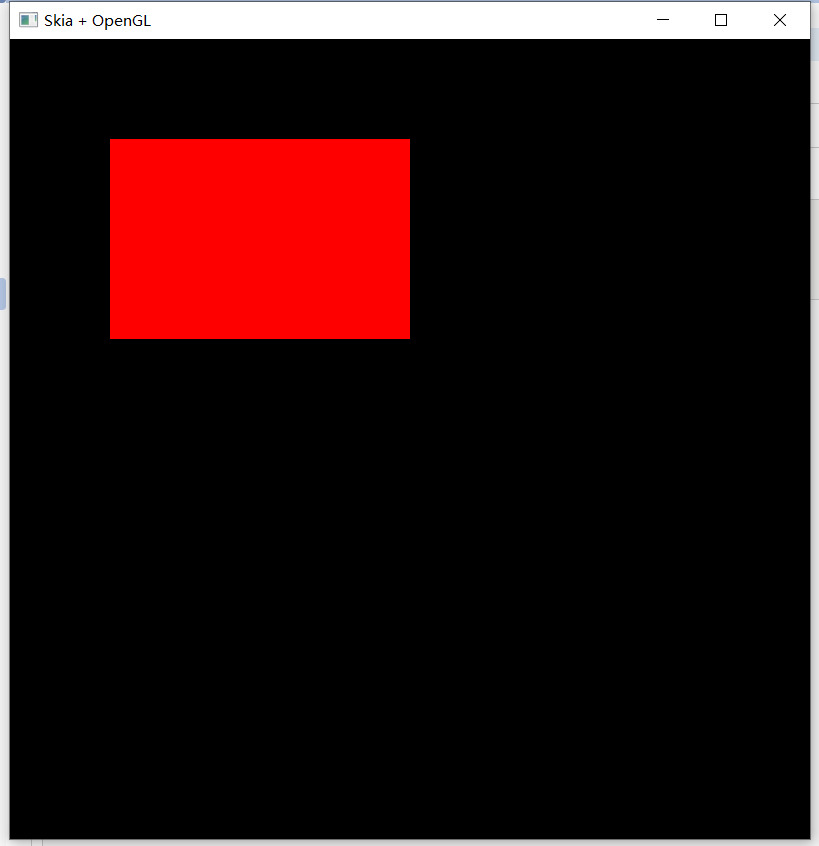
简单示例效果图:
感谢GPT的辅助,让我能把Skia小的Hello World写出来。